The forms your EMR doesn't do for you.
Ozempic and every other drug prior authorization, CPP disability, ODSP, WSIB, Disability Tax Credit, insurer and employer questionnaires — over 2,000 Canadian forms, drafted from the chart you already have, filled on the official PDF, double-checked by a second AI agent, signed by you, faxed from the same screen. And SafeAI, an assistant that reads the chart and writes the letter. And Safe Scribe, an AI scribe that turns the visit into the note. Keep your EMR. FormsMD does the paperwork beside it.
30 days free, no card to start. Accounts are checked by hand — usually within one business day.
How a form gets done
Fifteen minutes of your evening, not an hour and a half — which across a week of requests is the two to four hours a day most physicians lose to paperwork.
Bring what you already have
Export whatever you have from your own EMR — the whole patient chart, a single visit, medications, consult letters, correspondence — and drop the PDF or Word file in. The patient's details are lifted automatically, the history is summarized, and the form or letter is built from it. Nothing retyped.
The draft writes itself
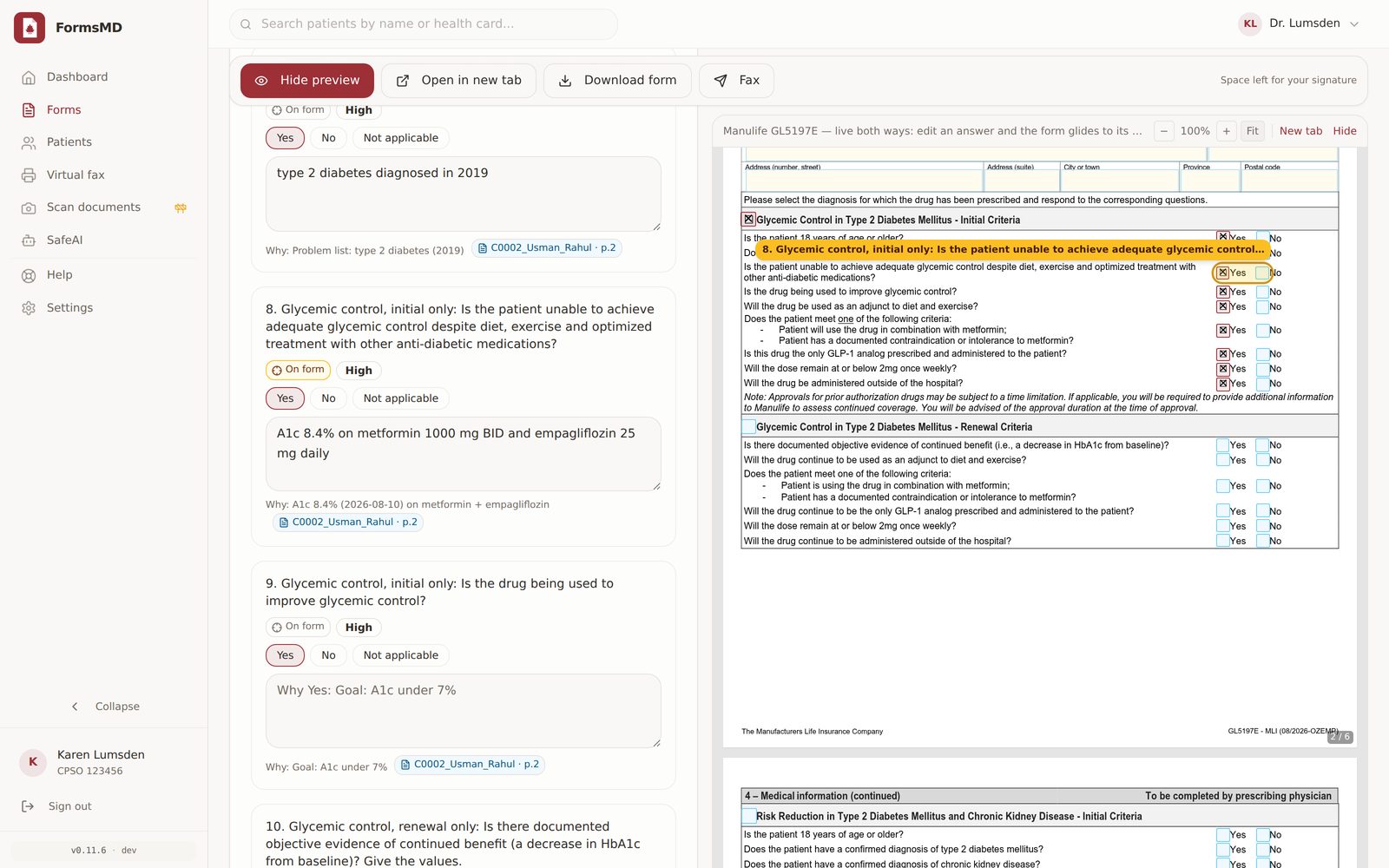
SafeAI reads your documents and fills the practitioner sections — impairments, restrictions, prognosis — in your words, for you to correct.
A Second Opinion, automatically
On Pro, a second AI agent — a different custom model from the one that wrote the draft — re-reads the chart and every answer: keeps what's supported, corrects what's imprecise, removes anything the chart doesn't say. You see each change and why.
Review, sign, send
Read it over and change anything you want — it's your document and your signature. Your clinic letterhead goes on, then save it as a PDF or Word file, or fax it straight to the number on the request: Service Canada, ODSP, WSIB or the insurer, with a delivery record for every page.
Built for the way a clinic day runs
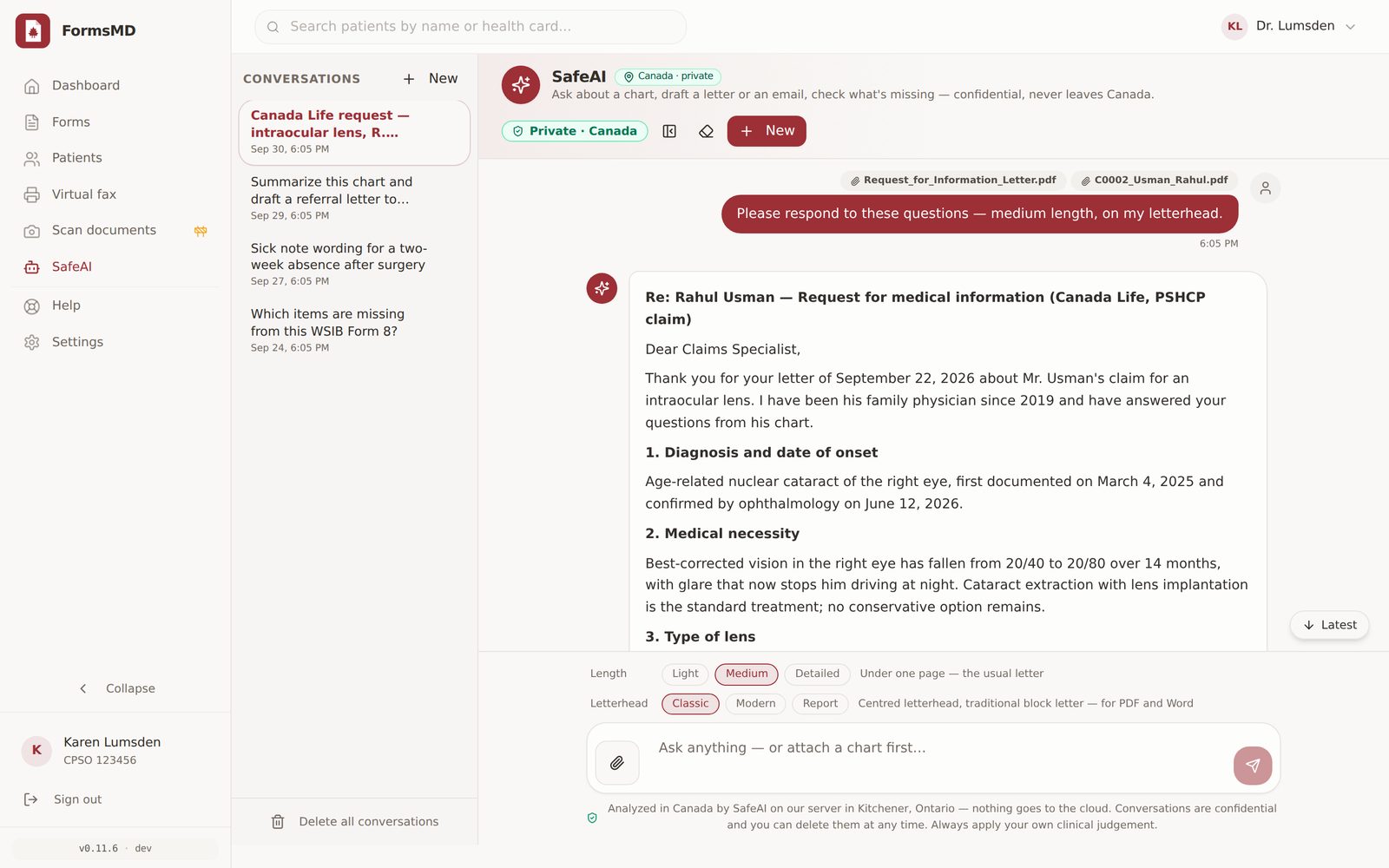
The forms, the letters, and an inbox for what comes back — each done properly. Click a screen to see it full size.


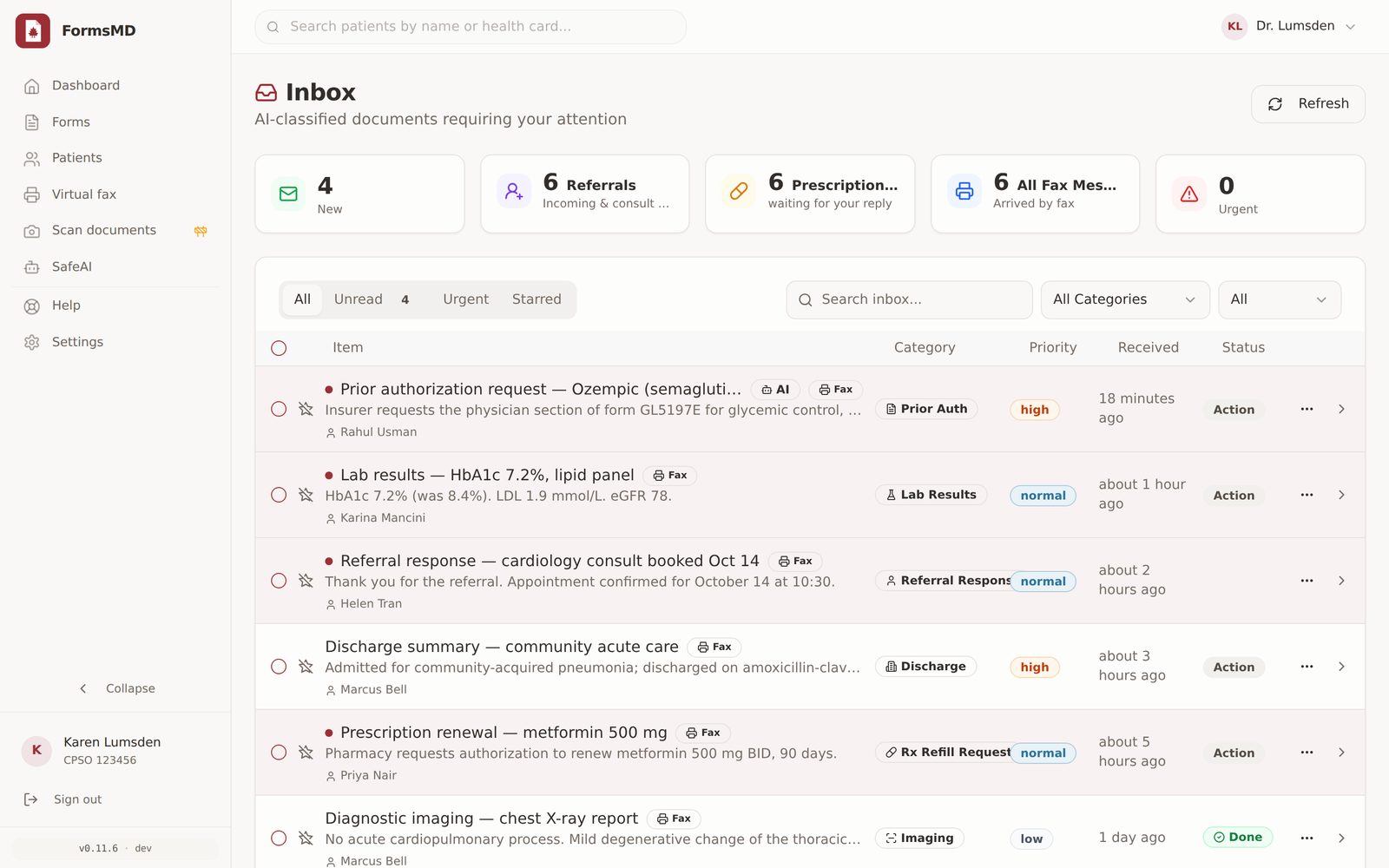
An inbox for the paperwork
Finished forms and incoming faxes, sorted and waiting — not lost in a shared fax machine tray.
Virtual fax, built in
Send the completed form — or anything else — and keep a delivery record for every page. Add a dedicated inbound number and replies land in your inbox.
SafeAI, in Canada
Analyzed in Canada by SafeAI on our server in Kitchener, Ontario — not a public AI service. Patient documents are read for the form or the letter and nothing more.
Safe Scribe, built in
Record the visit or dictate; the transcript and the note are written in Kitchener, Ontario and dropped in for you to sign. In beta — everything about Safe Scribe.
SafeAI — the assistant that has read the chart
Every FormsMD plan comes with SafeAI: attach a chart and ask. It answers insurer letters, writes referral and consult letters on your letterhead, summarizes a history, and tells you what's missing — all analyzed in Canada by SafeAI on our server in Kitchener, Ontario. Nothing goes to the cloud.
- Answer an insurer's letter — attach the request and the chart; every question is answered from the chart with the evidence it came from, as a letter ready to sign.
- Referral and consult letters — to an oncologist, neurologist, cardiologist, any specialist: concise, with the diagnosis, the reason, current medications and allergies, in your words. Light, medium or detailed — a half page to three pages, your call.
- Summarize the history — a new patient's 80-page chart in a page: problems, medications, what happened when.
- Ask anything — "when was the last A1c?", "has she ever been on a statin?", "what's missing for the WSIB form?"
- Sick notes, return-to-work, patient letters — the small paperwork, done in seconds.
- On your letterhead — Classic, Modern or Report layout, your CPSO number and clinic details, your saved signature; download as PDF or Word.
- SafeAI Verify — a second pass checks every drafted answer against the chart before you see it, and flags what the chart doesn't support.
- Private by design — conversations are confidential, stored encrypted with your practice's key, and deleted when you say so.
Write a referral letter to Dr. Mensah-Hart (orthopaedic surgery) for this patient — medium length, on my letterhead.
Re: Magdalena Garcia (DOB October 26, 1990)
Dear Dr. Mensah-Hart,
Reason for referral: an opinion on further management of a medial meniscus tear, left knee.
Ms. Garcia is a 35-year-old woman with a complex tear of the posterior horn of the medial meniscus on MRI (September 21, 2026), with intermittent pain and giving way despite physiotherapy and NSAIDs …
Current medications: Ibuprofen 400 mg TID with food. Allergies: none known.
SafeAI is a drafting assistant. Every letter and answer is yours to review and sign — it never sends anything on its own, and your clinical judgement always applies.
Safe Scribe — the visit becomes the note Beta
Built into FormsMD. Record the visit or dictate afterwards — from your phone, tablet or computer, in the browser, nothing to install. The transcript and the clinical note are written on our server in Kitchener, Ontario, in your template, and handed to you to review and sign. Nothing goes to the cloud.
- Patient visit or dictation — record the conversation and Safe Scribe tells the clinician's words from the patient's, or dictate the note yourself after the visit.
- Your note, your format — SOAP, DAP, progress note or your own template. Doses and numbers are copied as said, "unclear in recording" replaces a guess, and an "Items to confirm" line closes every note.
- It knows the patient's medications — the chart's medication list and allergies are fed to the listener, so metoprolol comes out as metoprolol.
- Checked twice — on Pro and Clinic, a second AI model reads the recording against the draft and corrects drug names, doses, numbers, left and right, and anything the recording doesn't support: the same Second Opinion your forms get.
- Any device, no app — Chrome, Edge, Firefox or Safari, on a phone, tablet or computer. Press Record; the browser asks once to use the microphone.
- Straight into the paperwork — the note goes to the chart, and SafeAI can turn it into the referral letter or the insurer's answer from the same screen.
- Private by design — recorded in your browser, transcribed and written in Kitchener, Ontario; the recording is deleted automatically after 30 days and the note stays under your practice's key.
Patient visit · 6 min 12 s · two speakers · note ready 48 s after Stop
S: 52-year-old man, follow-up of hypertension. Reports occasional morning headaches for two weeks; denies chest pain or visual change. Taking ramipril 10 mg daily; missed two doses last week.
O: BP 148/92 seated, repeat 144/90. Weight not discussed.
A: Hypertension, suboptimally controlled; adherence likely contributing.
P: Continue ramipril 10 mg daily. Home BP log twice daily for two weeks. Electrolytes and creatinine. Review in three weeks.
Items to confirm: none.
Safe Scribe is in beta and can mishear a drug name or a number — every note is yours to review before it goes in the chart. $15 a month on any plan, switchedFree during the beta, switched on from your Subscription page. Read more about Safe Scribe →
Privacy, the way Canadian practice requires
Patient records never leave Canada, and never reach a public AI service. FormsMD is built and operated to meet the privacy law that applies wherever you practise.
Canadian privacy law
Compliant with PHIPA (Ontario), PIPEDA (federal), PIPA (British Columbia and Alberta), HIA (Alberta), HIPA (Saskatchewan — not to be confused with US HIPAA), PHIA (Manitoba and the Atlantic provinces) and Quebec Law 25. You remain the health information custodian; FormsMD acts only as your agent and service provider.
Encrypted, practice by practice
Patient records are encrypted in transit and at rest, under a key held for your practice alone. Least-privilege access, audit logging and documented breach procedures throughout — HIPAA-aware practices, applied to Canadian law.
Data residency
Every record, uploaded chart, drafted form and fax stays in Canada, on our servers in Ontario. SafeAI runs on hardware we operate here — nothing is sent to OpenAI, Anthropic, Google or any other outside model.
Full detail in the privacy policy. Questions from your privacy officer are welcome at support@formsmd.ca.
Simple pricingFree while we're in beta
Every plan starts with a 30-day free trial. No card needed to start; cancel any time. Prices in CAD, plus HST.FormsMD is free for every practice during the beta. No card, no trial clock, nothing to cancel. What we ask for in return is honest feedback on what works and what doesn't.
When the beta ends, pricing is announced on this page first and every beta practice keeps a founding rate. Nothing is charged without you choosing a plan.
Starter
$39 / monthFreeduring the beta
Good output — one AI drafting pass
- 25 forms a month, then $2 each
- All forms and requests
- SafeAI drafting on-site
- Inbox and virtual fax
- 30-day free trialFree during the beta
For the occasional CPP, WSIB or insurer request.
Start free trialJoin the beta — freePro
$49 / monthFreeduring the beta
Founding rate for the first 20 practices — yours for as long as you stay. List price $89.
Best output — every draft gets a Second Opinion
- 150 forms a month, then $2 each
- Every draft double-checked by a second AI agent — a different custom model re-reads the chart and every answer before you see it
- SafeAI assistant — ask anything about the chart, in plain language
- All forms and requests
- Inbox and virtual fax
- Safe Scribe add-on: every note checked twice
- 30-day free trialFree during the beta
For practices where forms are a weekly job and every answer has to hold up.
Start free trialJoin the beta — freeClinic
$179 / monthFreeduring the beta
Best output — Second Opinion on every draft
- 500 forms a month, then $2 each
- Three physicians included, one bill
- Second Opinion and SafeAI assistant for everyone
- Shared inbox and virtual fax
- Safe Scribe add-on: every note checked twice
- 30-day free trialFree during the beta
For group practices. More physicians — talk to us.
Start free trialJoin the beta — freePrices in CAD, plus HST. A form = one AI-drafted document; editing, downloading and faxing a drafted form is free. No card to start; cancel any time.A form = one AI-drafted document; editing, downloading and faxing a drafted form is always free. No card, no charges during the beta.
Safe Scribe (AI scribe, beta) is $15 a month on any plan — add it from your Subscription page.is included free during the beta — switch it on from your Subscription page. On Pro and Clinic every note is checked twice by a second AI model.
Questions physicians ask
Does FormsMD replace my EMR?
No. FormsMD works beside the EMR you already use — Accuro, PS Suite, OSCAR, TELUS, anything that exports a PDF or Word file. Export whatever the form needs: the whole patient chart, one visit, the medication list, consult letters. Drop it in and the patient's details and history are read and summarized from it — nothing to retype.
Which forms does it fill?
Over 2,000 Canadian insurer forms, each filled on the insurer's own PDF — drug prior authorizations (Manulife GL5197E and Sun Life 4233-PA for Ozempic, plus Wegovy, Mounjaro, Dupixent, Botox and the rest), disability and attending physician statements from Manulife, Sun Life, Canada Life, Desjardins, Green Shield, Blue Cross, Equitable, RBC, Empire Life and more — plus CPP Disability (ISP-2519), Disability Tax Credit (T2201) Part B, ODSP Mandatory Special Necessities, WSIB FAF, Ontario lab requisitions, CT/MRI requisitions, referral letters and sick notes, and any questionnaire you upload from an insurer, employer or lawyer. Pick the form from the library, attach the chart, and it is filled.
What is SafeAI, and is it included?
SafeAI is included with every plan. Attach a chart and ask: it answers an insurer's letter question by question, writes referral and consult letters on your letterhead (light, medium or detailed), summarizes a history, and tells you what's missing for a form. Everything is analyzed in Canada on our own server in Kitchener, Ontario — nothing goes to a public AI service. Every draft is yours to edit and sign; SafeAI never sends anything on its own.
What is Safe Scribe?
The AI scribe built into FormsMD. Press Record in the browser — on a phone, tablet or computer, nothing to install — during the visit or for a dictation afterwards. The recording is transcribed and the clinical note is written in your template (SOAP, DAP, progress note or your own) on our server in Kitchener, Ontario; nothing goes to the cloud, and the recording is deleted automatically after 30 days. On Pro and Clinic a second AI model checks the note against the recording. Safe Scribe is in beta, costs $15 a month on any plan,is free during the beta, and every note is yours to review before it goes in the chart.
Where is patient data processed?
On servers in Ontario, Canada — nothing crosses the border. AI drafting runs on hardware FormsMD operates, not on a public AI service; patient records are encrypted at rest with a per-practice key. Documents you upload are read in your browser and only their text is sent for drafting.
Which privacy legislation does FormsMD meet?
FormsMD is compliant with PHIPA (Ontario), PIPEDA (federal), PIPA (British Columbia and Alberta), HIA (Alberta), HIPA (Saskatchewan), PHIA (Manitoba, Nova Scotia, New Brunswick, Newfoundland and Labrador, Prince Edward Island) and Quebec's Law 25. You remain the health information custodian for your patients' records; FormsMD acts as your agent and electronic service provider, handling personal health information only on your instructions. We're HIPAA-aware and follow its safeguards as good practice — encryption in transit and at rest, per-practice keys, least-privilege access, audit logging and breach procedures — though HIPAA itself is US legislation and FormsMD operates under Canadian law.
What happens if I go over my forms allowance?
Nothing stops. Forms beyond the allowance are $2 each and appear on your next invoice — you'll see the count on your Subscription page as you go. Drafting only pauses at three times the allowance, which is where moving up a plan would already cost you less. Editing, downloading and faxing a form you've already drafted is always free.
What exactly is the "Second Opinion" on Pro?
A second AI agent — a different custom model from the one that wrote the draft — re-reads the same chart and every drafted answer. It keeps what the chart supports, corrects what it supports differently, and removes anything it doesn't support. You see each change and the reason for it before you sign. Two independent models have to agree before an answer reaches you, which is how a claim of "best output" earns its name.
Does the AI sign or send anything on its own?
Never. Every field stays editable, ministry forms that require a wet-ink signature are flagged, and nothing is faxed until you press Send.
Is there a free trial?
During the beta, everything is free — no trial clock, no card, no charges. Yes — 30 days on every plan, no card to start. Add a card before the trial ends to keep going; cancel any time from Settings.
Try it on your next CPP form — free for 30 days.
Bring one exported PDF. If it doesn't save you an hour, you've lost ten minutes.